
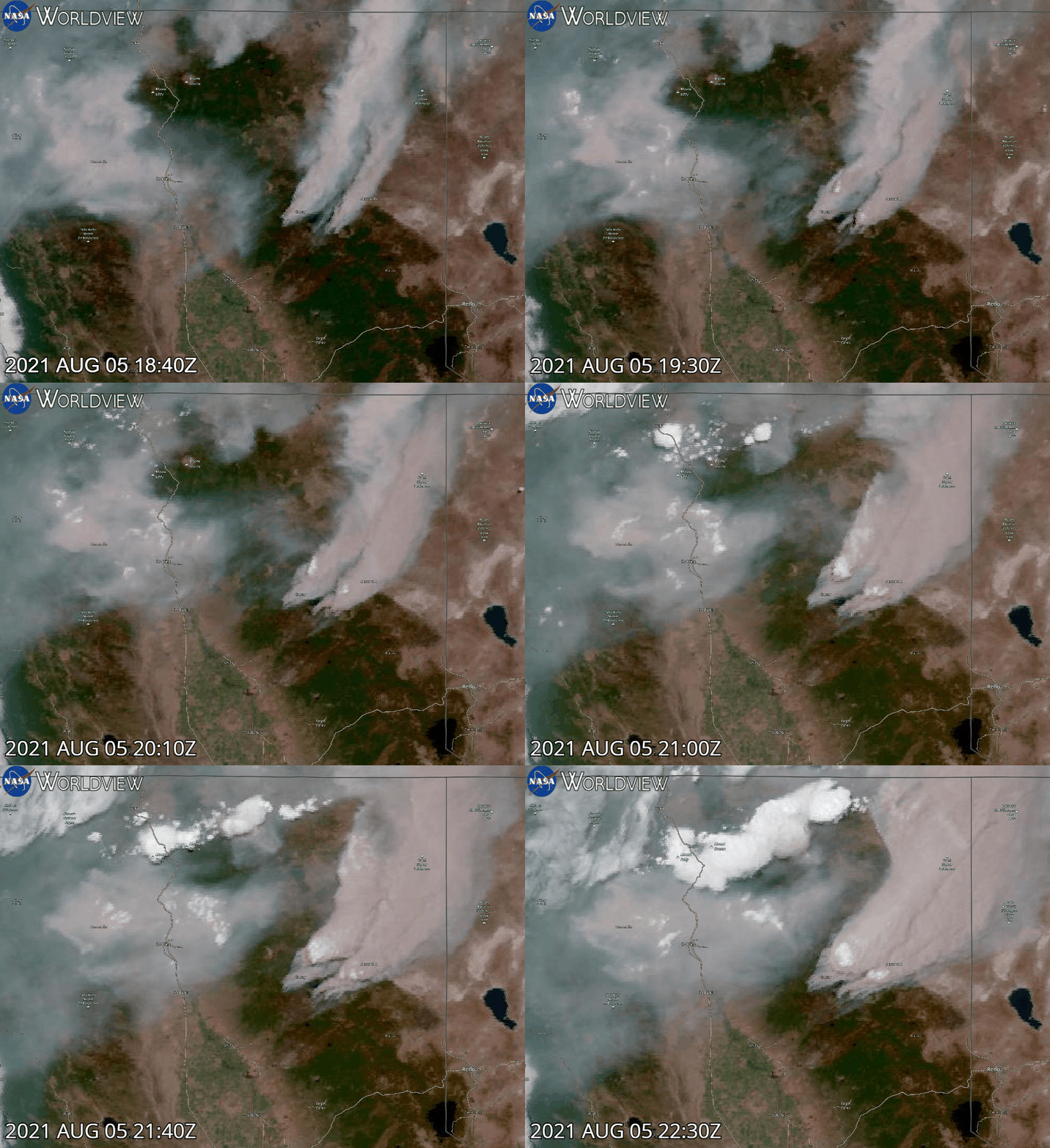
Wildfire monitoring has become an essential application of satellite imagery, enabling timely responses to natural disasters. The Copernicus Open Access Hub provides users with free access to Sentinel data, which, when combined with advanced visualization scripts, can offer a deeper understanding of wildfire dynamics. Pierre Markuse’s wildfire visualization script is a notable tool in this regard, as it effectively enhances the identification of burned areas and active fire zones using Sentinel-2 imagery. Below, we delve into how this script works and its practical applications for wildfire analysis.

The Science Behind the Script
Pierre Markuse’s script leverages the multispectral capabilities of Sentinel-2, particularly its shortwave infrared (SWIR), near-infrared (NIR), and visible bands. The key band combinations used in this script include:
- Band 12 (SWIR-2): Sensitive to moisture content in vegetation and soil, this band highlights burned areas as dark patches.
- Band 8A (Narrow NIR): Enhances vegetation health and differentiates healthy from stressed or burned vegetation.
- Band 4 (Red): Useful for identifying active fire fronts due to its sensitivity to high-temperature anomalies.
By combining these bands, the script generates a false-color composite that emphasizes:
- Burned areas (in shades of dark brown or black).
- Vegetation stress (reddish hues).
- Active fires (bright white or yellow pixels).

Implementation in the Copernicus Interface
To use the script, users must access the Sentinel Hub Playground or EO Browser, both of which support custom visualization scripts. The workflow includes the following steps:
- Data Selection:
- Select a recent Sentinel-2 scene covering the area of interest.
- Ensure cloud cover is minimal to maximize image clarity.
- Script Integration:
- Copy Pierre Markuse’s script from his GitHub repository or a trusted source.
- Paste the script into the custom visualization editor within the Sentinel Hub interface.
- Visualization:
- Adjust the parameters, such as brightness or contrast, to fine-tune the output.
- Interpret the results, focusing on the spatial distribution of burned areas and active fires.
Practical Applications
- Emergency Response: Real-time visualization of wildfire progression aids firefighting teams in allocating resources effectively.
- Damage Assessment: Post-fire analysis helps quantify the extent of burned areas, supporting ecological recovery efforts.
- Research and Monitoring: Long-term data series can be used to study wildfire frequency, intensity, and correlation with climatic variables.
Key Advantages
Pierre Markuse’s script stands out for its:
- Simplicity: Users with minimal coding experience can implement it seamlessly.
- Accuracy: The band combinations are optimized for wildfire visualization.
- Versatility: Applicable in various geographic regions and adaptable to different Sentinel-2 scenes.
Conclusion
The integration of Pierre Markuse’s wildfire visualization script into the Copernicus interface demonstrates the power of combining open-access satellite data with advanced analytical tools. For researchers, emergency responders, and environmentalists, this workflow represents a valuable resource for understanding and managing wildfires more effectively. By leveraging Sentinel-2’s rich spectral information, users can extract actionable insights and contribute to better wildfire mitigation and recovery strategies.

// VERSION=3
// QuickFire V1.0.0 by Pierre Markuse (https://twitter.com/Pierre_Markuse)
// Adjusted for use in the Copernicus Browser (https://dataspace.copernicus.eu/browser/)
// CC BY 4.0 International (https://creativecommons.org/licenses/by/4.0/)

// Copernicus Browser does not have the band CLP, this was replaced with the isCloud() function
// but do try to turn off cloudAvoidance if results aren't as expected.

function setup() {
    return {
        input: ["B02", "B03", "B04", "B08", "B8A", "B11", "B12", "dataMask"],
        output: { bands: 4 }
    };
}

function isCloud(samples) {
    const NGDR = index(samples.B03, samples.B04);
    const bRatio = (samples.B03 - 0.175) / (0.39 - 0.175);
    return bRatio > 1 || (bRatio > 0 && NGDR > 0);
}

function stretch(val, min, max) { return (val - min) / (max - min); }

function satEnh(arr, s) {
    var avg = arr.reduce((a, b) => a + b, 0) / arr.length;
    return arr.map(a => avg * (1 - s) + a * s);
}

function layerBlend(lay1, lay2, lay3, op1, op2, op3) {
    return lay1.map(function (num, index) {
        return (num / 100 * op1 + (lay2[index] / 100 * op2) + (lay3[index] / 100 * op3));
    });
}

function evaluatePixel(sample) {
    const hsThreshold = [2.0, 1.5, 1.25, 1.0];
    const hotspot = 1;
    const style = 1;
    const hsSensitivity = 1.0;
    const boost = 1.2;

    const cloudAvoidance = 1;
    const avoidanceHelper = 0.8;

    const offset = -0.007;
    const saturation = 1.10;
    const brightness = 1.40;
    const sMin = 0.15;
    const sMax = 0.99;

    const showBurnscars = 0;
    const burnscarThreshold = -0.25;
    const burnscarStrength = 0.3;

    const NDWI = (sample.B03 - sample.B08) / (sample.B03 + sample.B08);
    const NDVI = (sample.B08 - sample.B04) / (sample.B08 + sample.B04);
    const waterHighlight = 0;
    const waterBoost = 2.0;
    const NDVI_threshold = 0.05;
    const NDWI_threshold = 0.0;
    const waterHelper = 0.1;

    const Black = [0, 0, 0];
    const NBRindex = (sample.B08 - sample.B12) / (sample.B08 + sample.B12);
    const naturalColorsCC = [Math.sqrt(brightness * sample.B04 + offset), Math.sqrt(brightness * sample.B03 + offset), Math.sqrt(brightness * sample.B02 + offset)];
    const naturalColors = [(2.5 * brightness * sample.B04 + offset), (2.5 * brightness * sample.B03 + offset), (2.5 * brightness * sample.B02 + offset)];
    const URBAN = [Math.sqrt(brightness * sample.B12 * 1.2 + offset), Math.sqrt(brightness * sample.B11 * 1.4 + offset), Math.sqrt(brightness * sample.B04 + offset)];
    const SWIR = [Math.sqrt(brightness * sample.B12 + offset), Math.sqrt(brightness * sample.B8A + offset), Math.sqrt(brightness * sample.B04 + offset)];
    const NIRblue = colorBlend(sample.B08, [0, 0.25, 1], [[0 / 255, 0 / 255, 0 / 255], [0 / 255, 100 / 255, 175 / 255], [150 / 255, 230 / 255, 255 / 255]]);
    const classicFalse = [sample.B08 * brightness, sample.B04 * brightness, sample.B03 * brightness];
    const NIR = [sample.B08 * brightness, sample.B08 * brightness, sample.B08 * brightness];
    const atmoPen = [sample.B12 * brightness, sample.B11 * brightness, sample.B08 * brightness];
    var enhNaturalColors = [0, 0, 0];
    for (let i = 0; i < 3; i += 1) { enhNaturalColors[i] = (brightness * ((naturalColors[i] + naturalColorsCC[i]) / 2) + (URBAN[i] / 10)); }

    const manualCorrection = [0.04, 0.00, -0.05];

    var Viz = layerBlend(URBAN, SWIR, naturalColorsCC, 10, 10, 90); // Choose visualization(s) and opacity here

    if (waterHighlight) {
        if ((NDVI < NDVI_threshold) && (NDWI > NDWI_threshold) && (sample.B04 < waterHelper)) {
            Viz[1] = Viz[1] * 1.2 * waterBoost + 0.1;
            Viz[2] = Viz[2] * 1.5 * waterBoost + 0.2;
        }
    }

    Viz = satEnh(Viz, saturation);
    for (let i = 0; i < 3; i += 1) {
        Viz[i] = stretch(Viz[i], sMin, sMax);
        Viz[i] += manualCorrection[i];
    }

    if (hotspot) {
        if ((!cloudAvoidance) || (!isCloud(sample) && (sample.B02 < avoidanceHelper))) {
            switch (style) {
                case 1:
                    if ((sample.B12 + sample.B11) > (hsThreshold[0] / hsSensitivity)) return [((boost * 0.50 * sample.B12) + Viz[0]), ((boost * 0.50 * sample.B11) + Viz[1]), Viz[2], sample.dataMask];
                    if ((sample.B12 + sample.B11) > (hsThreshold[1] / hsSensitivity)) return [((boost * 0.50 * sample.B12) + Viz[0]), ((boost * 0.20 * sample.B11) + Viz[1]), Viz[2], sample.dataMask];
                    if ((sample.B12 + sample.B11) > (hsThreshold[2] / hsSensitivity)) return [((boost * 0.50 * sample.B12) + Viz[0]), ((boost * 0.10 * sample.B11) + Viz[1]), Viz[2], sample.dataMask];
                    if ((sample.B12 + sample.B11) > (hsThreshold[3] / hsSensitivity)) return [((boost * 0.50 * sample.B12) + Viz[0]), ((boost * 0.00 * sample.B11) + Viz[1]), Viz[2], sample.dataMask];
                    break;
                case 2:
                    if ((sample.B12 + sample.B11) > (hsThreshold[3] / hsSensitivity)) return [1, 0, 0, sample.dataMask];
                    break;
                case 3:
                    if ((sample.B12 + sample.B11) > (hsThreshold[3] / hsSensitivity)) return [1, 1, 0, sample.dataMask];
                    break;
                case 4:
                    if ((sample.B12 + sample.B11) > (hsThreshold[3] / hsSensitivity)) return [Viz[0] + 0.2, Viz[1] - 0.2, Viz[2] - 0.2, sample.dataMask];
                    break;
                default:
            }
        }
    }

    if (showBurnscars) {
        if (NBRindex < burnscarThreshold) {
            Viz[0] = Viz[0] + burnscarStrength;
            Viz[1] = Viz[1] + burnscarStrength;
        }
    }

    return [Viz[0], Viz[1], Viz[2], sample.dataMask];
}
Sources:
https://custom-scripts.sentinel-hub.com/custom-scripts/sentinel-2/markuse_fire/
https://custom-scripts.sentinel-hub.com/custom-scripts/sentinel-3/enhanced_true_color-2/
https://medium.com/sentinel-hub/create-useful-and-beautiful-satellite-images-with-custom-scripts-8ef0e6a474c6
Alberto C.
GIS Analyst
 Geovisualization.net